Choose a service.
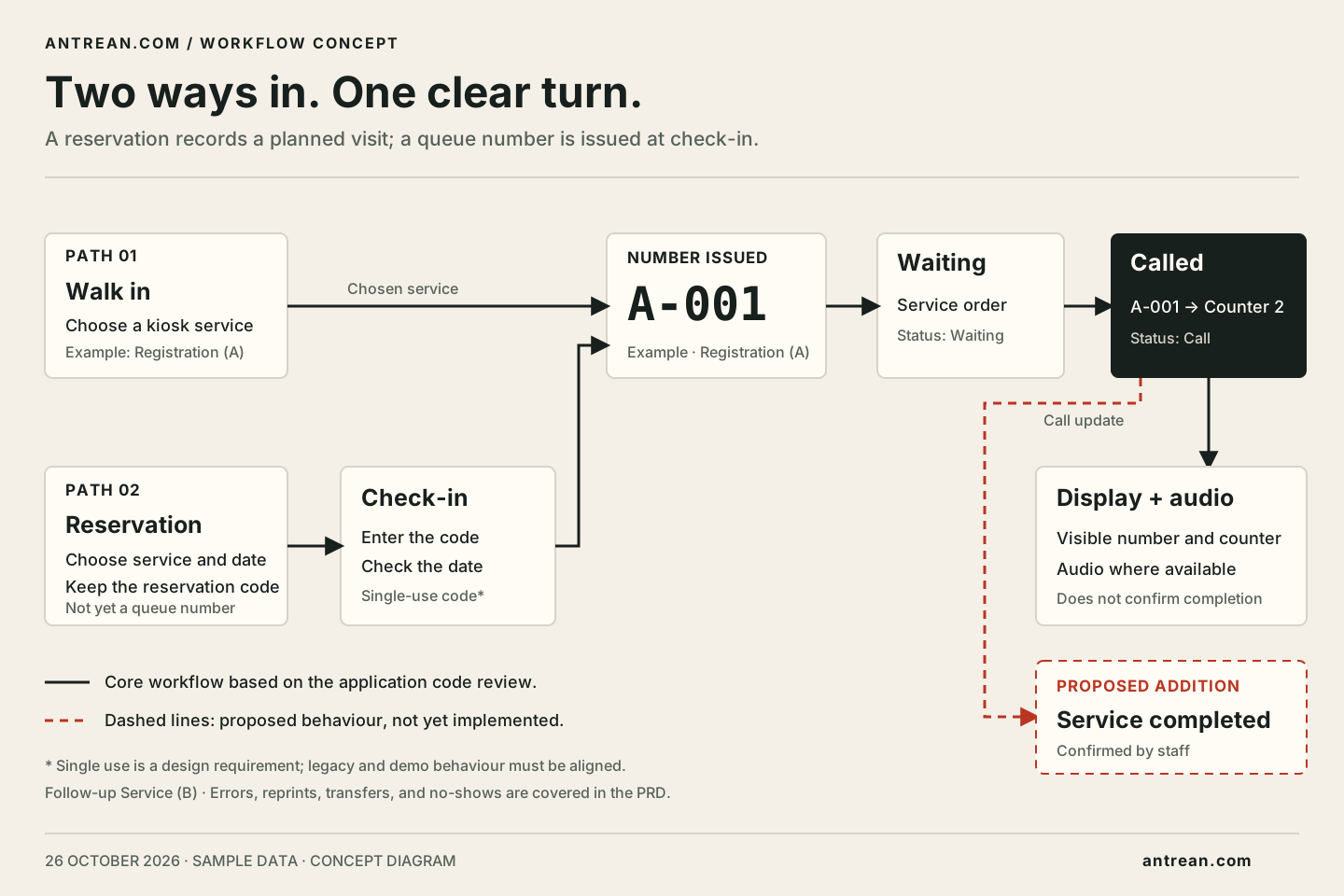
Walking in? Choose the service you need at the kiosk. In this example, Registration uses the prefix A.
How it works
Visitors, staff, and the waiting area each have a different view. The queue number connects them.
Walking in? Choose the service you need at the kiosk. In this example, Registration uses the prefix A.
A successfully issued number joins the service queue. Keep the number, or print a ticket if printing equipment is available.
Staff call the next number. The number and destination counter appear on the display; the call can be repeated when needed.
Go to the counter shown. If you are directed to Follow-up Service, check the new number and queue rules shown before the transfer.
When using a reservation
Check the listed service and date, then keep the code. Check in on arrival to obtain a queue number. The simulation uses today's date in Jakarta time. This basic reservation does not promise a specific service time.
Read about the differenceKeep using the number already issued. Check its status and ask staff for help, rather than taking a new number because the ticket has not printed. Printing integration requires equipment testing.
Audio can complement the display depending on the equipment used. The number and counter must remain visible when audio is unavailable.
In the simulation, the visitor receives a new number at the destination service. The original number remains linked in the history, and the destination queue position follows the transfer time. Transfer rules for a real service must be stated before use.
Next step
In the demo, you can switch roles without entering visitor identity details.